- Auto-generates beatmaps from music
- Engaging rhythm gameplay experience
- Multiple difficulty levels available
- Steam Workshop customization support
- Poor beat detection and sync
- Eye strain and visual issues
Emotions
Archetypes
What players like:
Common complaints:
Gameplay feedback:
Performance notes:
Recommendations:
Other player notes:
Similar games
Blend with other games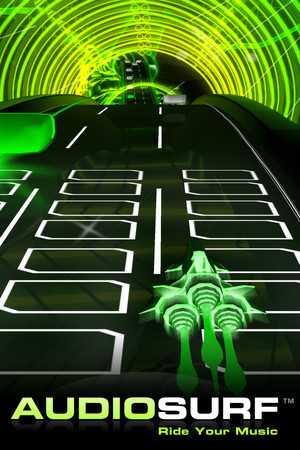




Review evidence
Why players say this
Review evidence
Why players say this
Steam review verdict
This rhythm game auto-generates beatmaps from your music with engaging gameplay, multiple difficulties, and Steam Workshop support, but weak beat detection and sync plus eye strain hurt it.
What players like
Auto-Generated Beatmaps from Music: The game automatically generates unique levels or beatmaps from any provided song. The music analyzer is surprisingly accurate and syncs well with tracks.
Multiple Difficulty Levels Offered: The game provides several difficulty modes, from relaxing to extremely challenging. Custom difficulty options cater to a wide range of player skills.
Engaging Rhythm Gameplay: The core rhythm mechanics are well-received, with commands matching musical beats. It is considered a great time-waster and enjoyable for music lovers.
Character Customization via Workshop: Players can customize their character's appearance using skins and hairstyles, including many player-made options from Steam Workshop.
Pleasant Visual Style: The graphics are simple but nice, with a pleasing visual style. The visuals are considered perfect by some players.
Common complaints
Poor Beat Detection and Sync: The rhythm detection algorithm often fails to detect beats accurately, especially for non-4/4 time signatures or complex rhythms. Even when beats are detected, the generated charts can be off-sync, leading to a disjointed experience.
Eye Strain and Visual Issues: Many players report eye strain, headaches, and even motion sickness due to fast-moving visuals, bright colors, and motion blur. The visual clutter and lack of settings to mitigate these issues are common complaints.
Difficulty Imbalance and Progression: The difficulty curve is uneven: some modes are too easy while others are brutally hard, with little middle ground. Higher difficulties often feel unfair due to dense note patterns and lack of proper scaling.
Chart Generation Limitations: The automatic chart generation is often monotonous and fails to create varied or engaging patterns, especially for certain genres. It prioritizes drums over other instruments, leading to poor mapping for rock and metal songs.
Input and Control Issues: Players experience input delays, unresponsive controls, and awkward timing windows, leading to frustration. The controls are often confusing and not well explained.
Gameplay and performance
Custom music support: Players can import their own music files (e.g., MP3, WAV, FLAC) to play, and the game supports various audio formats. This allows using personal music libraries.
Rhythm-based gameplay: The core gameplay is a rhythm game where players tap keys to the beat of the music. It combines runner and platformer elements, with levels generated from the selected song.
Multiple difficulty levels: The game offers several difficulty settings, including Relaxing, Medium, Intense, and Overload, with some modes requiring more keys. Difficulty can also vary based on the song.
Automatic level generation: The game automatically analyzes imported music to generate playable levels, using beat detection and algorithms to sync obstacles with the rhythm. No manual chart editing is required.
Steam Workshop mods: Steam Workshop support allows players to download and share character skins, mods, and possibly other customizations. This extends the game's customization options.
Performance varies across framerates: Higher framerates and refresh rates generally improve visual clarity and reduce timing issues, while lower settings can cause visual clutter that makes gameplay harder. Cluster 1, 2, and 3 highlight this performance gradient across different display configurations.
Weak GPUs struggle to run: Integrated graphics like the 610M cannot handle the game, and the actual requirements exceed the listed specs. This can mislead players with lower-end hardware.
Low-end PCs can run game: Even budget hardware can achieve above 60FPS on low settings, and the game is playable on older computers. This suggests reasonable scalability for lower-end systems.
Stutters occur on max settings: Despite modest visuals, the game can stutter at maximum settings, and music visualization in the sky may tax average computers. These performance hiccups detract from the experience.
Old hardware causes delays: On older systems, delay and frame-rate issues break the fun. Upgrading to a gaming laptop and applying game updates eliminated the delay.
Recommendations
Ideal for rhythm game fans: Many reviewers recommend the game specifically for enthusiasts of rhythm and music games, noting it caters well to their interests. It is frequently described as a must-play for those who enjoy the genre.
Best purchased on sale: Several reviewers suggest waiting for a discount, with some explicitly recommending buying at 75% off. Many feel the game is not worth the full price.
Supports personal music libraries: Players with large or diverse local music collections highly recommend the game for its ability to use their own songs. It is praised as a great way to interact with and enjoy personal music.
Controller recommended over keyboard: Using a gamepad is often advised over a keyboard for a better experience. Some also note it serves as good practice for gamepad controls.
Not for hardcore rhythm veterans: Hardcore or professional rhythm game players may find the game lacking in challenge and precision. It is not recommended for those seeking a solid competitive rhythm experience.
Buying context
Community fair range: $5.00 - $10.00.
Game completion: 10.0h.
Session length: 1.0h.
Endgame: 1000.0h.
Reports describe an immediately addictive music game when songs sync well, but the fun fades after a few hours as beat-detection problems, wrong song sections, and a lack of progression make play tedious.
Friction: Unreliable beat detection for some songs, including 4/4 tempo tracks.; Algorithm-selected song sections can miss the parts the player wants.; Hard-to-see sequences appear when the speed picks up.; Visual latency and visuals that hurt the eyes after a few hours..
Player profiles
Casual Chill Seeker: Plays on lower difficulty, imports their own songs, and zones out at their own pace without chasing scores. Motivation: Relaxing and unwinding after a busy day by vibing to music with minimal pressure. Stance: buy.
Hardcore Rhythm Veteran: Plays high difficulties, expects accurate beat mapping, and compares chart quality against top-ranked rhythm titles. Motivation: Seeking tight rhythmic feedback and increasing challenge that matches competitive rhythm games. Stance: no buy.
Personal Music Enthusiast: Imports local music, customizes characters and visuals, and replays favorite songs for the vibe. Motivation: Interacting with and deepening enjoyment of their personal music collection. Stance: buy.
Platform notes
Steam Deck: Feedback for Melody Escape indicates a largely seamless handheld experience: controller and keyboard input work out of the box, personal music and streaming integration function reliably, and no crashes, optimization problems, external launchers, Proton tweaks, or anti-cheat errors were reported. The one substantive technical barrier is a visual speed and frame-timing issue that persists across all refresh rates and causes headaches on both desktop monitors and small handheld screens. A minor onboarding curve for the controls was noted but resolved quickly. No battery drain, unreadable text, or launcher navigation problems appeared in the reviews.
Other review notes
Comparisons to Other Rhythm Games: Reviewers compare the game to various rhythm games such as Beatmania, DDR, Stepmania, Muse Dash, osu!, Geometry Dash, and others. It is often seen as a decent alternative with its own charm.
Steam Workshop Support: The game features Steam Workshop support for player-made skins, character customization, and mods. It is considered a major feature with an active modding community.
Comparison to Audiosurf: Many reviewers compare the game to Audiosurf, often noting similarities in concept but differences in difficulty and execution. Some find it less complex or easier than Audiosurf.
Import Own Music Collection: The game allows players to use any music file from their own collection, including importing from USB sticks or iTunes. It has no built-in music, relying on user-provided songs.
Music File Format Support: Reviewers highlight support for various audio and video formats including MP3, WAV, M4A, OGG, AIF, and even AVI movie files. This allows using a wide range of personal music.